You may use the Dell Lifecycle Controller to configure the AC Power Recovery setting for a Dell PowerEdge R630 server. While the server is booting up press F2 then navigate to System BIOS > System Security > AC Power Recovery > Off.
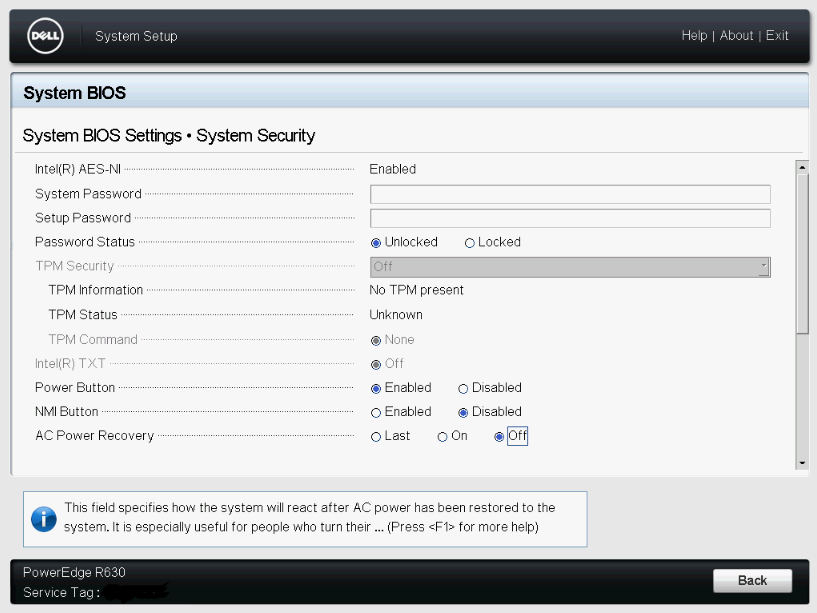
You may use the Dell Lifecycle Controller to configure the AC Power Recovery setting for a Dell PowerEdge R630 server. While the server is booting up press F2 then navigate to System BIOS > System Security > AC Power Recovery > Off.
The Microsoft Windows PowerShell script below will provide the status of a service on the specified server.
<#
.SYNOPSIS
This script will provide the status of a service on the specified server.
.DESCRIPTION
This script automates the process for verifying the status of a service.
.EXAMPLE
N/A.
.AUTHOR
Written by Noel Enrique Alvarez on Tuesday, November 24, 2015.
#>
$SERVER = Read-Host “What is the hostname of the server?”
$SERVICE = Read-Host “What is the name of the service?”
get-service -computername $SERVER | where-object {$_.name -eq “$SERVICE”}